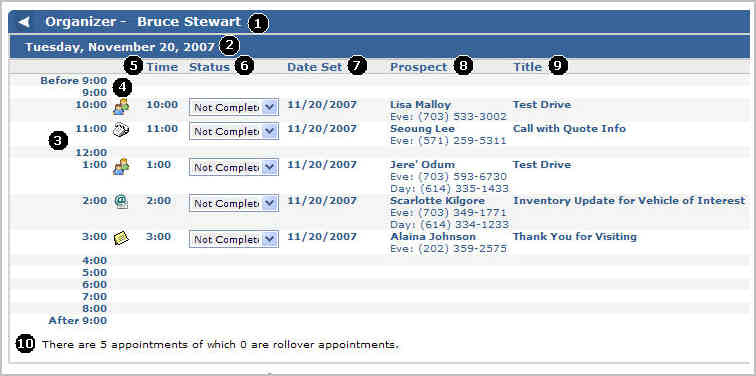
The Organizer Schedule displays information based on the criteria specified in the Organizer View. Use the Organizer Schedule to see and track the activities associated with your prospects.
|
1 |
Name of person whose Organizer is displaying |
|
2 |
Day and date of Organizer information |
|
3 |
Time scale - See Schedule an Action for more information |
|
4 |
|
|
5 |
Time for scheduled activity |
|
6 |
Status of activity - See Complete an Action for more information |
|
7 |
Date the activity was scheduled |
|
8 |
Prospect name and phone information - Click the prospect's name to open the Prospect Details record |
|
9 |
Title of the activity |
|
10 |
Number of Total and Rollover appointments - Appointments that are not completed will be carried over from one day to the next up to ten days |
Created: December 2007